Model Guide
AtomGit provides a rich set of model resources, which you can easily create, search, download, and use. This guide will help you understand how to perform model-related operations on the platform.
Model Creation
Create a New Model
- Log in to your AtomGit account
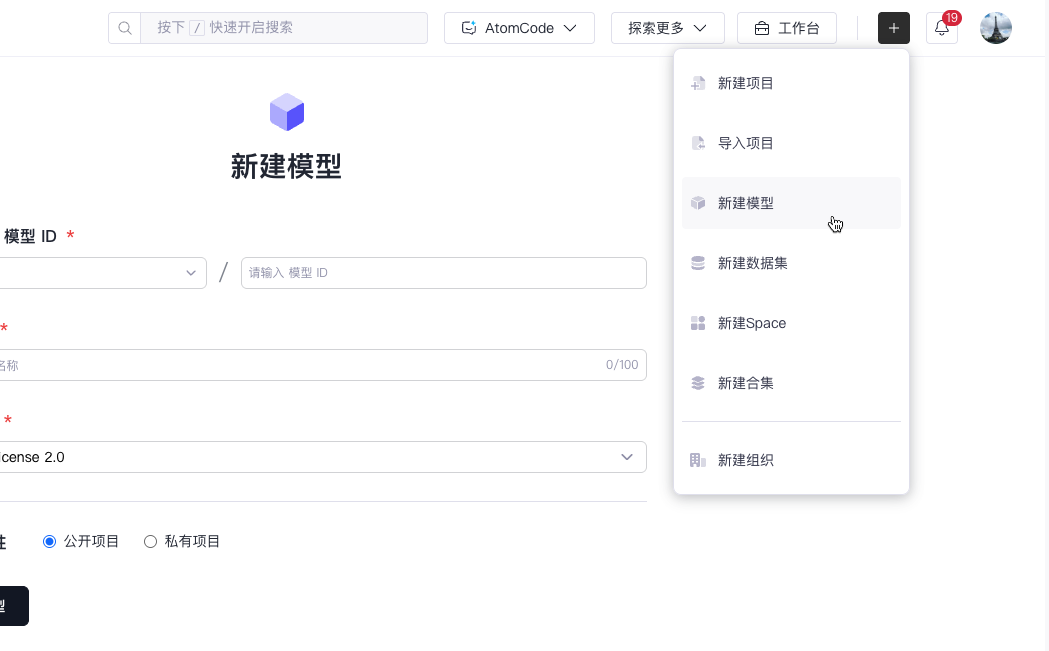
- Click "+" at the top right > "New Model"
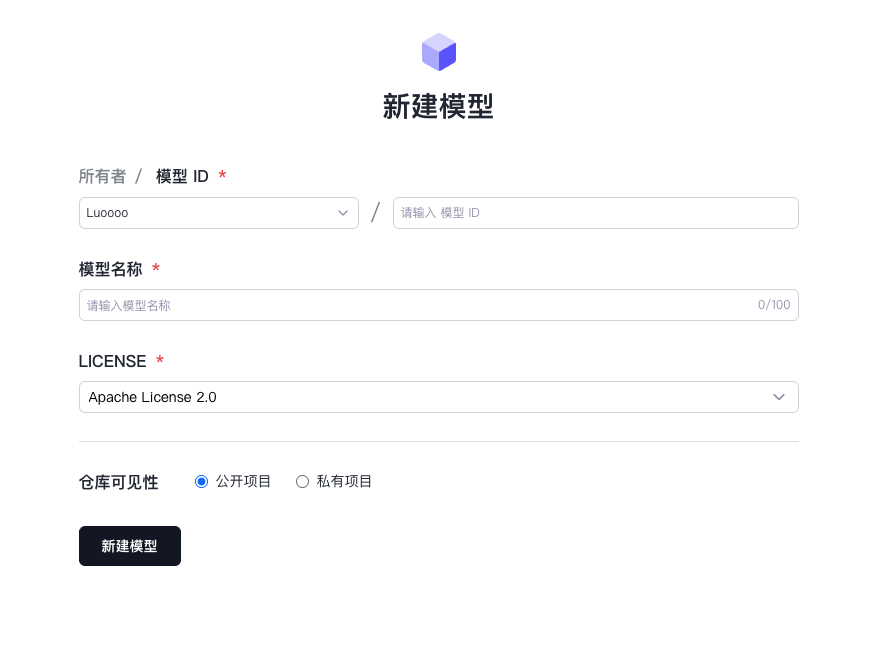
- Fill in the basic information of the model:
- Model ID
- Model Name
- Select a LICENSE template
- Choose whether to make it public
- Select a LICENSE template:
- PyTorch Creative Commons Attribution Non Commercial 3.0
- Creative Commons Attribution Non Commercial No Derivatives 3.0
- Creative Commons Attribution Non Commercial Share Alike 2.0
- Creative Commons Attribution Non Commercial Share Alike 3.0
- H Research License
- Open Model, Data & Weights License Agreement
- Unknown
- Click "Create Model" to complete
Model Configuration File
Each model requires a model-config.yaml configuration file, as shown in the example:
model-name: my-awesome-model
version: 1.0.0
framework: pytorch
task: image-classification
dependencies:
  - torch>=2.0.0
  - transformers>=4.30.0
Model Search
Quick Search
- Enter a keyword in the search box
- Use filters to sort:
- Task type
- Framework
- License
- Download count
- Update time
Advanced Search
The following advanced search syntax is supported:
framework:pytorch- Search by frameworktask:nlp- Search by task typestars:>100- Search by star countlanguage:python- Search by programming language
Model Download
Download Using Web Interface
- Go to the model details page
- Click the "Download" button
- Choose version and format
Download Using Command Line
# Install GitCode CLI
pip install gitcode

# Download model
gitcode download username/model-name

# Download specific version
gitcode download username/model-name --version v1.0.0
Model Usage
Python Code Example
from gitcode_hub import load_model

# Load model
model = load_model("username/model-name")

# Use model for inference
result = model.predict(input_data)
API Call Example
import requests

API_URL = "https://api.gitcode.com/v1/models/username/model-name"
headers = {"Authorization": f"Bearer {API_TOKEN}"}

def query(payload):
    response = requests.post(API_URL, headers=headers, json=payload)
    return response.json()

# Send inference request
output = query({
    "inputs": "Hello, World!" ,
})
Best Practices
-
Version Control
- Use semantic version numbers
- Maintain backward compatibility
- Record version change logs
-
Documentation
- Provide detailed model descriptions
- Include usage examples
- Explain model limitations and notes
-
Performance Optimization
- Provide quantized model versions
- Support batch inference
- Optimize inference speed
-
Security
- Conduct model security testing
- Provide model cards describing potential risks
- Comply with data privacy requirements
Frequently Asked Questions
Q: How do I update a published model? A: You can publish a new version through the version management feature, or update the files of the existing version.
Q: What formats does the model support? A: It supports mainstream deep learning framework formats, including PyTorch, TensorFlow, ONNX, etc.
Q: How to handle model dependencies?
A: Declare dependencies in model-config.yaml, or provide a requirements.txt file.