Large Model Applications
7.1 Evaluation of LLM
In recent years, with the rapid development of the artificial intelligence field, large-scale pre-trained language models (referred to as large models) have become a core force in driving technological advancement. These large models have demonstrated remarkable capabilities in tasks such as natural language processing. However, to accurately measure the performance of a large model, scientific and reasonable evaluation is essential.
What is large model evaluation? Large model evaluation refers to the quantification and comparison of a large model's performance on various tasks through various standardized methods and datasets. These evaluations not only include the accuracy of the model on specific tasks, but also involve aspects such as the model's generalization ability, reasoning speed, and resource consumption. Through evaluation, we can gain a more comprehensive understanding of the actual performance of large models and their potential for application in the real world.
The development cost of large models is high, involving a large amount of computing resources and data, so evaluation is crucial to ensure the practical value of the model. First, evaluation can reveal the performance of the model on various tasks, helping researchers and companies assess the applicability and reliability of the model. Second, evaluation can expose the potential weaknesses of the model, such as bias and robustness issues, thereby providing a basis for further optimization and improvement. In addition, fair and open evaluation provides a common standard for the academic and industrial communities, promoting technological exchange and progress.
7.1.1 Evaluation Datasets for LLM
In the evaluation process of large models, using standardized evaluation sets is crucial. Currently, mainstream large model evaluation sets mainly evaluate from the following aspects, each with its unique use and typical application scenarios:
-
General Evaluation Sets:
- MMLU (Massive Multitask Language Understanding): MMLU evaluates the understanding ability of models in various tasks, including various disciplines and knowledge areas. It specifically includes tasks such as history, mathematics, physics, biology, and law, comprehensively examining the model's knowledge reserve and language understanding ability in different disciplines.
-
Tool Usage Evaluation Sets:
- BFCL V2: Used to evaluate the model's performance in complex tool usage tasks, especially the correctness and efficiency in executing multi-step operations. These tasks usually involve interacting with databases or performing specific instructions to simulate actual tool usage scenarios.
-
Mathematical Evaluation Sets:
- GSM8K: GSM8K is a dataset containing primary school math problems used to test the model's mathematical reasoning and logical analysis abilities. Specific tasks include arithmetic operations, solving simple equations, and numerical reasoning. Although the problems in GSM8K may seem simple, the model needs to understand the problem semantics and perform correct mathematical operations, reflecting the dual challenges of logical reasoning and language understanding.
- MATH: The MATH dataset is used to test the model's performance on more complex mathematical problems, including algebra and geometry.
-
Reasoning Evaluation Sets:
- ARC Challenge: The ARC Challenge evaluates the model's performance in scientific reasoning tasks, especially in answering common-sense and scientific questions. Typical application scenarios include answering science exam questions and developing encyclopedic question-answering systems.
- GPQA: Used to evaluate the model's ability to answer open-ended questions in a zero-shot setting, typically applied in customer service chatbots and knowledge question-answering systems, helping the model provide reasonable answers even without specific domain data.
- HellaSwag: Evaluates the model's ability to choose the most logically consistent answer in complex contexts, suitable for scenarios such as story continuation and dialogue generation that require high-level understanding and reasoning.
-
Long Text Understanding Evaluation Sets:
- InfiniteBench/En.MC: Evaluates the model's ability to handle long text reading comprehension, especially the understanding of scientific literature, applicable to scenarios such as automatic summarization of academic literature and analysis of long reports.
- NIH/Multi-needle: Used to test the model's understanding and summary ability in diverse sample long documents, applied in scenarios such as government report interpretation and enterprise internal long document analysis that require processing massive information.
-
Multilingual Evaluation Sets:
- MGSM: Used to evaluate the model's ability to solve mathematical problems in different languages, examining the model's multilingual adaptability, especially suitable for mathematical education and cross-language technical support scenarios in international environments.
The diversity of these evaluation sets helps us comprehensively evaluate the performance of large models in different tasks and application scenarios, ensuring that the model maintains efficient and accurate performance when handling a variety of tasks. For example, in the MMLU evaluation, some large models perform well in tasks such as history and physics, demonstrating a deep understanding of multi-domain knowledge; in the GSM8K math evaluation, the latest large models show near or even surpassing human benchmarks in arithmetic and equation solving, showing potential in complex mathematical reasoning tasks. These actual evaluation results demonstrate the progress and application potential of the model in various complex tasks.
7.1.2 Main Evaluation Leaderboards
The evaluation of large models is not limited to using specific datasets, many institutions also release model ranking lists based on evaluation results. These leaderboards provide important references for the academic and industrial communities, helping them understand the current cutting-edge technologies and models. The following are some mainstream evaluation leaderboards:
OpenCompass
OpenCompass is a domestic evaluation leaderboard that evaluates the performance of large models on various languages and tasks, providing references for specific applications in the Chinese market. This leaderboard combines tests of Chinese language understanding and multilingual capabilities to meet local needs, and pays special attention to the accuracy, robustness, and adaptability of large models in the Chinese context, providing an important reference for domestic enterprises and researchers to choose appropriate models.
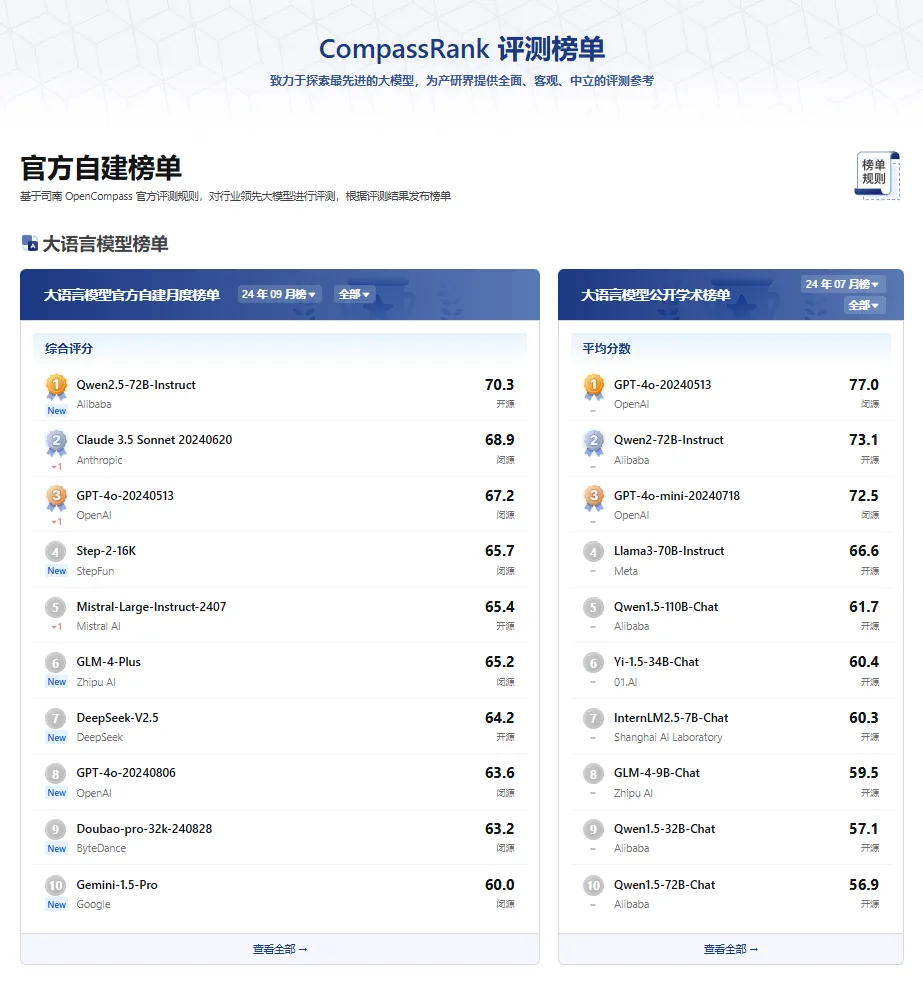
Figure 7.1 OpenCompass
7.1.3 Specific Evaluation Leaderboards
In addition, there are also large model evaluation leaderboards for specific tasks in different fields, as shown in Figure 7.4. These leaderboards focus on specific application areas, helping users understand the capabilities of large models in a certain vertical field:
-
Financial List: Based on CFBenchmark evaluation set, it evaluates the ability of large models in financial natural language processing, financial prediction calculation, and financial analysis and security checks. Provided by Tongji University, Shanghai Artificial Intelligence Lab, and Oriental Finance.
-
Security List: Based on Flames evaluation set, it evaluates the resistance of large models in five dimensions: fairness, security, data protection, and legality, helping to deeply understand the performance of models in terms of security. Provided by Shanghai Artificial Intelligence Lab and Fudan University.
-
General Knowledge List: Based on BotChat evaluation set, it evaluates the comprehensive ability of large language models to generate daily multi-turn dialogues, determining whether the model has human-like levels in dialogues. Provided by Shanghai Artificial Intelligence Lab.
-
Legal List: Based on LawBench evaluation set, it evaluates the understanding, reasoning, and application abilities of models in the legal field, covering tasks such as answering legal questions, text generation, and legal case analysis. Provided by Nanjing University.
-
Medical List: Based on MedBench evaluation set, it evaluates the performance of large language models in medical knowledge Q&A and safety ethics understanding. Provided by Shanghai Artificial Intelligence Lab.
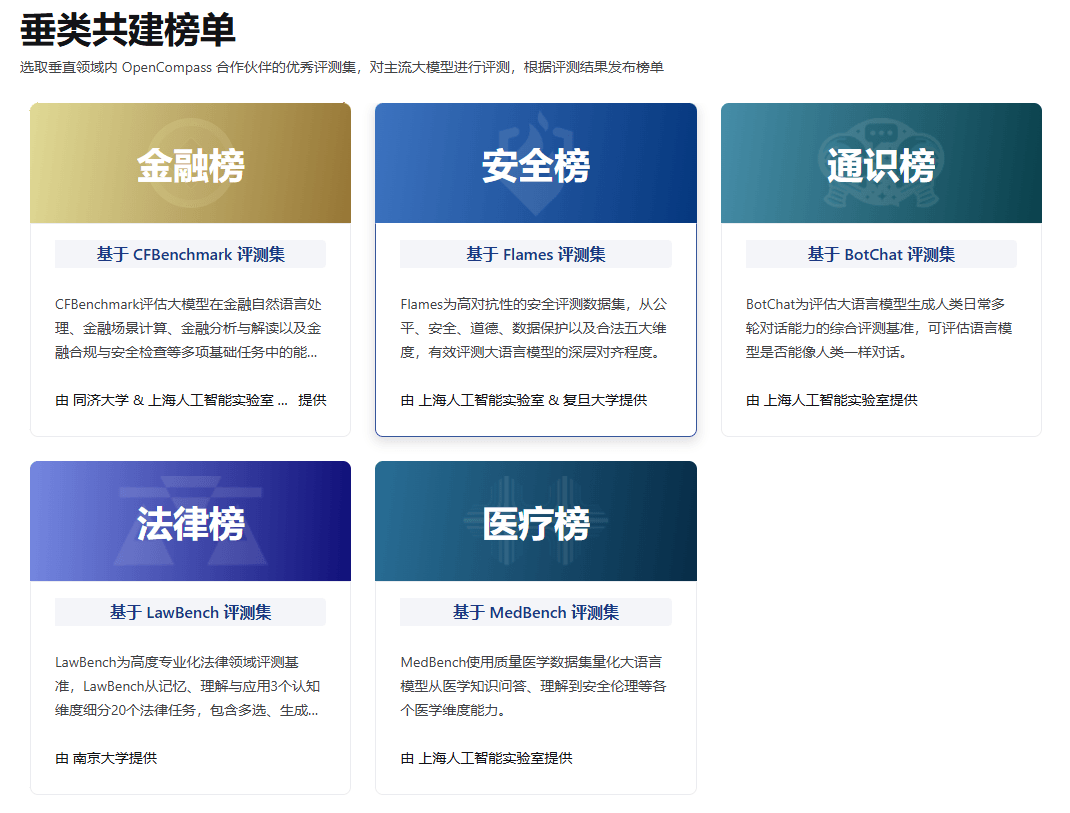
Figure 7.4 Vertical Field Leaderboards
7.2 RAG
7.2.1 Basic Principles of RAG
Although large language models (LLMs) have strong language understanding and generation capabilities when generating content, they also face some challenges. For example, LLMs sometimes generate inaccurate or misleading content, which is referred to as "hallucinations" of large models. In addition, the training data relied upon by the model may be outdated, especially when facing the latest information, making it difficult to guarantee the accuracy and timeliness of the generated results. For specific domain expertise, the processing efficiency of LLMs is also low, and they cannot deeply understand complex domain knowledge. Therefore, how to improve the quality and efficiency of the generation of large models has become an important research direction.
In this context, Retrieval-Augmented Generation (RAG) technology emerged as an innovative trend in the AI field. RAG first retrieves relevant information from an external large document database before generating an answer, and then incorporates this information into the generation process, thus greatly improving the accuracy and relevance of content generation. This process not only significantly enhances the accuracy and relevance of content generation but also makes the generated content more in line with real-time requirements.
The core principle of RAG lies in combining "retrieval" and "generation": when a user poses a query, the system first finds relevant text segments through the retrieval module, then passes these segments as additional information to the language model, and the model generates a more accurate and reliable answer based on this. Through this approach, RAG effectively alleviates the "hallucination" problem of large language models because the generated content is based on real documents, making the answer more traceable and credible. At the same time, due to the introduction of the latest information sources, RAG technology greatly accelerates the speed of knowledge updates, enabling the system to promptly absorb and reflect the latest developments in the field.
7.2.2 Building a RAG Framework
Next, I will guide you step by step to implement a simple RAG model. This model is a simplified version of RAG, called Tiny-RAG. Tiny-RAG retains only the core functions of RAG, namely retrieval and generation, with the aim of helping you better understand the principles and implementation of the RAG model.
Step 1: Introduction to the RAG Process
RAG improves the accuracy and relevance of content generation by retrieving relevant information from a wide document database before generating an answer. RAG effectively alleviates the hallucination problem, increases the speed of knowledge updates, and enhances the traceability of content generation, making large language models more practical and trustworthy in real-world applications.
What are the basic structures of RAG?
- Vectorization module: Used to vectorize document fragments.
- Document loading and splitting module: Used to load documents and split them into document fragments.
- Database: Stores document fragments and their corresponding vector representations.
- Retrieval module: Retrieves relevant document fragments based on Query (question).
- Large model module: Answers the user's question based on the retrieved documents.
These are all the modules of TinyRAG, as shown in Figure 7.5.
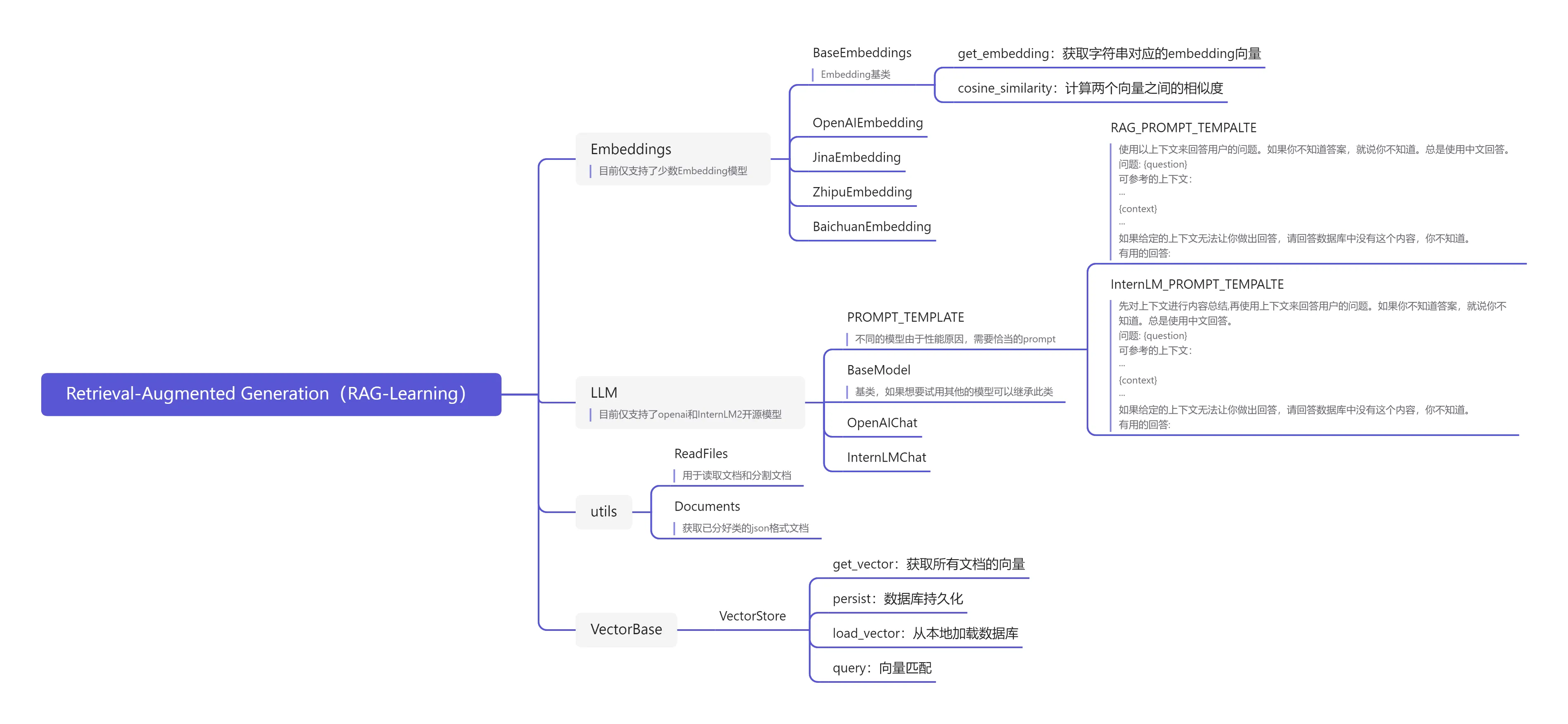
Figure 7.5 TinyRAG Project Structure
Next, let's outline what the RAG process looks like?
- Indexing: Split the document library into shorter fragments and build a vector index through an encoder.
- Retrieval: Retrieve relevant document fragments based on the similarity between the question and the fragments.
- Generation: Generate an answer to the question based on the retrieved context.
As shown in Figure 7.6, the flowchart, the image source is Retrieval-Augmented Generation for Large Language Models: A Survey.
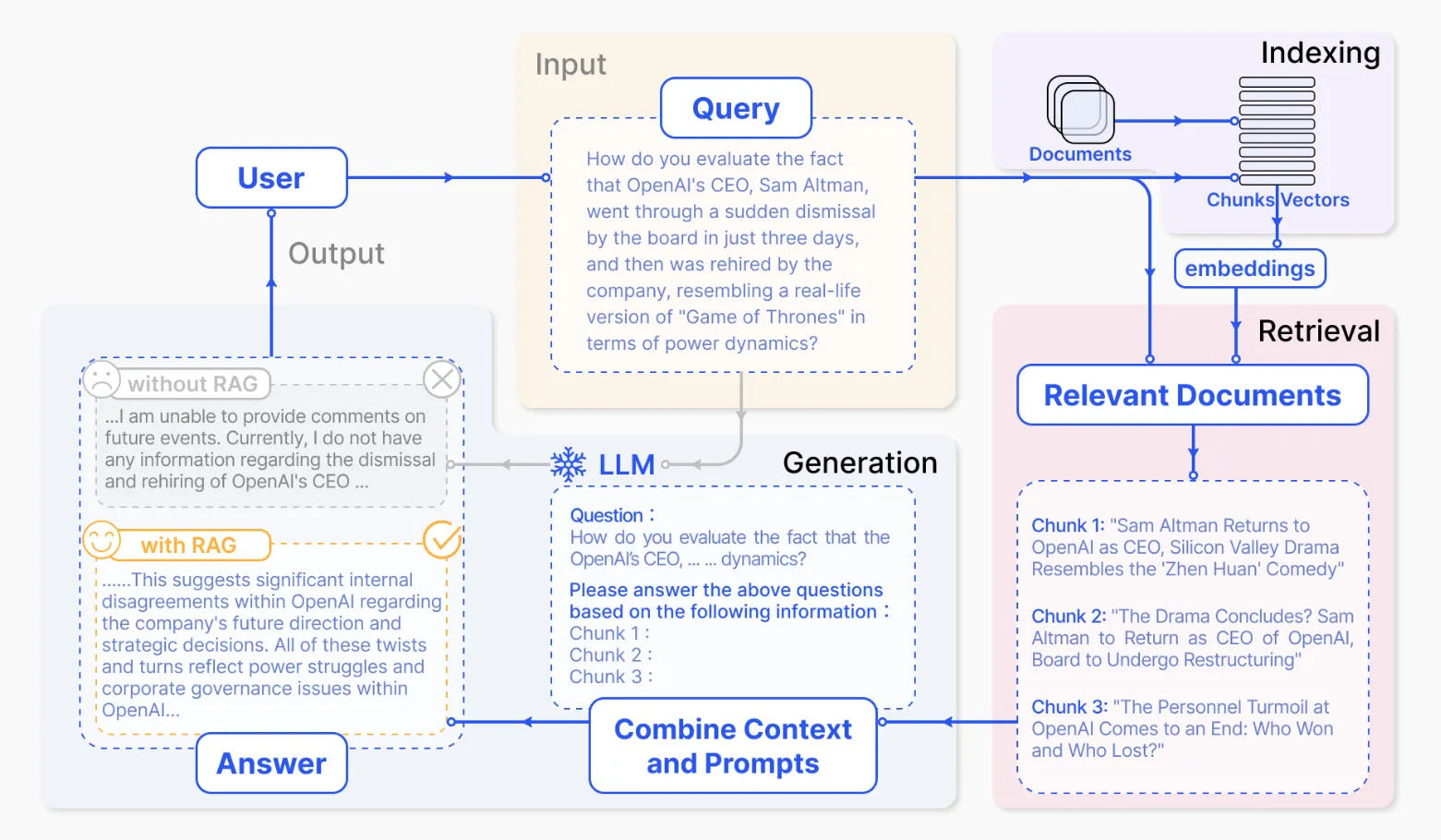
Figure 7.6 RAG Flowchart
Step 2: Document Loading and Splitting
Next, we will implement a class for document loading and splitting, which is mainly used to load documents and split them into document fragments.
Documents can be articles, books, dialogues, code, etc., text content, for example, pdf files, md files, txt files, etc. The complete code can be found in the RAG/utils.py file. This code supports loading files of types such as pdf, md, and txt, just need to write the corresponding functions.
def read_file_content(cls, file_path: str):
    # Choose the reading method based on the file extension
    if file_path.endswith('.pdf'):
        return cls.read_pdf(file_path)
    elif file_path.endswith('.md'):
        return cls.read_markdown(file_path)
    elif file_path.endswith('.txt'):
        return cls.read_text(file_path)
    else:
        raise ValueError("Unsupported file type")
After the document is read, it needs to be split. We can set a maximum token length and split the document based on this maximum length. When splitting the document, it is best to split it by sentences (split by \n), and ensure that there is some overlapping content between the fragments to improve the accuracy of retrieval.
def get_chunk(cls, text: str, max_token_len: int = 600, cover_content: int = 150):
    chunk_text = []

    curr_len = 0
    curr_chunk = ''

    token_len = max_token_len - cover_content
    lines = text.splitlines()  # Assume text is split into lines by newline characters

    for line in lines:
        # Keep spaces, only remove leading and trailing spaces
        line = line.strip()
        line_len = len(enc.encode(line))

        if line_len > max_token_len:
            # If the length of a single line exceeds the limit, split it into multiple chunks
            # First save the current chunk (if any content exists)
            if curr_chunk:
                chunk_text.append(curr_chunk)
                curr_chunk = ''
                curr_len = 0

            # Split the long line by token length
            line_tokens = enc.encode(line)
            num_chunks = (len(line_tokens) + token_len - 1) // token_len

            for i in range(num_chunks):
                start_token = i * token_len
                end_token = min(start_token + token_len, len(line_tokens))

                # Decode the token fragment back to text
                chunk_tokens = line_tokens[start_token:end_token]
                chunk_part = enc.decode(chunk_tokens)

                # Add overlapping content (except for the first chunk)
                if i > 0 and chunk_text:
                    prev_chunk = chunk_text[-1]
                    cover_part = prev_chunk[-cover_content:] if len(prev_chunk) > cover_content else prev_chunk
                    chunk_part = cover_part + chunk_part

                chunk_text.append(chunk_part)

            # Reset the current chunk state
            curr_chunk = ''
            curr_len = 0

        elif curr_len + line_len + 1 <= token_len:  # +1 for newline
            # The current line can be added to the current chunk
            if curr_chunk:
                curr_chunk += '\n'
                curr_len += 1
            curr_chunk += line
            curr_len += line_len
        else:
            # The current line cannot be added to the current chunk, start a new chunk
            if curr_chunk:
                chunk_text.append(curr_chunk)

            # Start a new chunk, add overlapping content
            if chunk_text:
                prev_chunk = chunk_text[-1]
                cover_part = prev_chunk[-cover_content:] if len(prev_chunk) > cover_content else prev_chunk
                curr_chunk = cover_part + '\n' + line
                curr_len = len(enc.encode(cover_part)) + 1 + line_len
            else:
                curr_chunk = line
                curr_len = line_len

    # Add the last chunk (if any content exists)
    if curr_chunk:
        chunk_text.append(curr_chunk)

    return chunk_text
Step 3: Vectorization
First, let's implement a vectorization class, which is the foundation of the RAG architecture. The vectorization class is mainly used to vectorize document fragments, mapping a piece of text to a vector.
First, we need to set up a BaseEmbeddings base class, so that when we use other models, we only need to inherit this base class and make modifications on this basis, which is convenient for code expansion.
class BaseEmbeddings:
    """
    Base class for embeddings
    """
    def __init__(self, path: str, is_api: bool) -> None:
        """
        Initialize the embedding base class
        Args:
            path (str): Path to the model or data
            is_api (bool): Whether to use API method. True means using online API service, False means using local model
        """
        self.path = path
        self.is_api = is_api

    def get_embedding(self, text: str, model: str) -> List[float]:
        """
        Get the embedding vector representation of the text
        Args:
            text (str): Input text
            model (str): Name of the model used
        Returns:
            List[float]: Embedding vector of the text
        Raises:
            NotImplementedError: This method needs to be implemented in the subclass
        """
        raise NotImplementedError

    @classmethod
    def cosine_similarity(cls, vector1: List[float], vector2: List[float]) -> float:
        """
        Calculate the cosine similarity between two vectors
        Args:
            vector1 (List[float]): First vector
            vector2 (List[float]): Second vector
        Returns:
            float: Cosine similarity between the two vectors, ranging from [-1,1]
        """
        # Convert input lists to numpy arrays and specify data type as float32
        v1 = np.array(vector1, dtype=np.float32)
        v2 = np.array(vector2, dtype=np.float32)

        # Check for infinite or NaN values in the vectors
        if not np.all(np.isfinite(v1)) or not np.all(np.isfinite(v2)):
            return 0.0

        # Calculate the dot product of the vectors
        dot_product = np.dot(v1, v2)
        # Calculate the norm (length) of the vectors
        norm_v1 = np.linalg.norm(v1)
        norm_v2 = np.linalg.norm(v2)

        # Calculate the denominator (product of the norms of the two vectors)
        magnitude = norm_v1 * norm_v2
        # Handle the special case where the denominator is zero
        if magnitude == 0:
            return 0.0

        # Return the cosine similarity
        return dot_product / magnitude
The BaseEmbeddings base class has two main methods: get_embedding and cosine_similarity. get_embedding is used to get the vector representation of the text, and cosine_similarity is used to calculate the cosine similarity between two vectors. When initializing the class, the path of the model and whether it is an API model are set, for example, when using the OpenAI Embedding API, set self.is_api=True.
To inherit the BaseEmbeddings class, only the get_embedding method needs to be implemented, and the cosine_similarity method will be inherited. This is the benefit of writing a base class.
class OpenAIEmbedding(BaseEmbeddings):
    """
    class for OpenAI embeddings
    """
    def __init__(self, path: str = '', is_api: bool = True) -> None:
        super().__init__(path, is_api)
        if self.is_api:
            self.client = OpenAI()
            # Get the key for Si Ji Liu Liu's large model API service from the environment variable
            self.client.api_key = os.getenv("OPENAI_API_KEY")
            # Get the base URL for Si Ji Liu Liu's large model API service from the environment variable
            self.client.base_url = os.getenv("OPENAI_BASE_URL")

    def get_embedding(self, text: str, model: str = "BAAI/bge-m3") -> List[float]:
        """
        By default, use the free embedding model BAAI/bge-m3 provided by Si Ji Liu Liu
        """
        if self.is_api:
            text = text.replace("\n", " ")
            return self.client.embeddings.create(input=[text], model=model).data[0].embedding
        else:
            raise NotImplementedError
Note: Here we default to the Si Ji Liu Liu Large Model API Service accessible by domestic users.
Step 4: Database and Vector Retrieval
After completing the document segmentation and embedding model loading, we need to design a vector database to store document fragments and their corresponding vector representations, as well as design a retrieval module for retrieving relevant document fragments based on the query.
The function of the vector database includes:
persist: Persist the database.load_vector: Load the database from the local.get_vector: Get the vector representation of the document.query: Retrieve relevant document fragments based on the question.
The complete code can be found in the /VectorBase.py file.
class VectorStore:
    def __init__(self, document: List[str] = ['']) -> None:
        self.document = document

    def get_vector(self, EmbeddingModel: BaseEmbeddings) -> List[List[float]]:
        # Obtain the vector representation of the document
        pass

    def persist(self, path: str = 'storage'):
        # Persist the database
        pass

    def load_vector(self, path: str = 'storage'):
        # Load the database from the local
        pass

    def query(self, query: str, EmbeddingModel: BaseEmbeddings, k: int = 1) -> List[str]:
        # Retrieve relevant document fragments based on the question
        pass
The query method is used to vectorize the user's question and then retrieve relevant document fragments from the database and return the results.
def query(self, query: str, EmbeddingModel: BaseEmbeddings, k: int = 1) -> List[str]:
    query_vector = EmbeddingModel.get_embedding(query)
    result = np.array([self.get_similarity(query_vector, vector) for vector in self.vectors])
    return np.array(self.document)[result.argsort()[-k:][::-1]].tolist()
Step 5: Large Model Module
Next is the large model module, which is used to answer the user's question based on the retrieved documents.
First, implement a base class to facilitate the expansion of other models.
class BaseModel:
    def __init__(self, path: str = '') -> None:
        self.path = path

    def chat(self, prompt: str, history: List[dict], content: str) -> str:
        pass

    def load_model(self):
        pass
BaseModel contains two methods: chat and load_model. For locally running open-source models, load_model needs to be implemented, while API models do not. Here, we still use the Si Ji Liu Liu Large Model API Service accessible by domestic users. The advantage of using the API service is that users do not need local computing resources, which greatly lowers the learning threshold for learners.
from openai import OpenAI

class OpenAIChat(BaseModel):
    def __init__(self, model: str = "Qwen/Qwen2.5-32B-Instruct") -> None:
        self.model = model

    def chat(self, prompt: str, history: List[dict], content: str) -> str:
        client = OpenAI()
        client.api_key = os.getenv("OPENAI_API_KEY")
        client.base_url = os.getenv("OPENAI_BASE_URL")
        history.append({'role': 'user', 'content': RAG_PROMPT_TEMPLATE.format(question=prompt, context=content)})
        response = client.chat.completions.create(
                model=self.model,
                messages=history,
                max_tokens=2048,
                temperature=0.1
            )
        return response.choices[0].message.content
Design a specific RAG large model prompt, as follows:
RAG_PROMPT_TEMPLATE="""
Use the above context to answer the user's question. If you don't know the answer, say you don't know. Always answer in Chinese.
Question: {question}
Context to refer to:
···
{context}
···
If the given context does not allow you to answer, please answer that the database does not have this content, and you don't know.
Useful answer:
"""
With this, we can use the InternLM2 model for RAG!
Step 6: Tiny-RAG Demo
Next, let's look at the Tiny-RAG demo!
from VectorBase import VectorStore
from utils import ReadFiles
from LLM import OpenAIChat
from Embeddings import OpenAIEmbedding

# Not saving the database
docs = ReadFiles('./data').get_content(max_token_len=600, cover_content=150) # Get all file contents in the data directory and split them
vector = VectorStore(docs)
embedding = OpenAIEmbedding() # Create EmbeddingModel
vector.get_vector(EmbeddingModel=embedding)
vector.persist(path='storage') # Save the vector and document content to the storage directory, next time you can directly load the local database

# vector.load_vector('./storage') # Load the local database

question = 'What is the principle of RAG?'

content = vector.query(question, EmbeddingModel=embedding, k=1)[0]
chat = OpenAIChat(model='Qwen/Qwen2.5-32B-Instruct')
print(chat.chat(question, [], content))
You can also load a pre-processed database from the local:
from VectorBase import VectorStore
from utils import ReadFiles
from LLM import OpenAIChat
from Embeddings import OpenAIEmbedding

# After saving the database
vector = VectorStore()

vector.load_vector('./storage') # Load the local database

question = 'What is the principle of RAG?'

embedding = ZhipuEmbedding() # Create EmbeddingModel

content = vector.query(question, EmbeddingModel=embedding, k=1)[0]
chat = OpenAIChat(model='Qwen/Qwen2.5-32B-Instruct')
print(chat.chat(question, [], content))
Note: All code in section 7.2 can be found in Happy-LLM Chapter7 RAG.
7.3 Agent
7.3.1 What is an LLM Agent?
In short, a large model Agent is a system that uses an LLM as its core "brain" and grants it the ability to plan autonomously, remember, and use tools. It is no longer just passively responding to user prompts (Prompt), but can:
- Understand the goal (Goal Understanding): Receive a relatively complex or high-level goal (e.g., "Help me plan a weekend trip to Beijing and book a flight and hotel").
- Autonomous planning (Planning): Break down the big goal into a series of executable steps (e.g., "Search for Beijing attractions", "Check the weather", "Compare flight prices", "Find suitable hotels", "Call the booking API", etc.).
- Memory (Memory): Have short-term memory (remember the context of the current task) and long-term memory (learn and retrieve information from past interactions or external knowledge bases).
- Tool use (Tool Use): Call external APIs, plugins, or code execution environments to obtain information (such as search engines, databases), perform operations (such as sending emails, booking services), or perform calculations.
- Reflection and iteration (Reflection & Iteration): (In more advanced Agents) Evaluate its own behavior and results, learn from them, and adjust subsequent plans.
Traditional LLMs are like knowledgeable but only talk about theory librarians, while LLM Agents are more like all-around personal assistants, not only knowing much but also being able to go out and do things, and even actively think about the optimal solution.
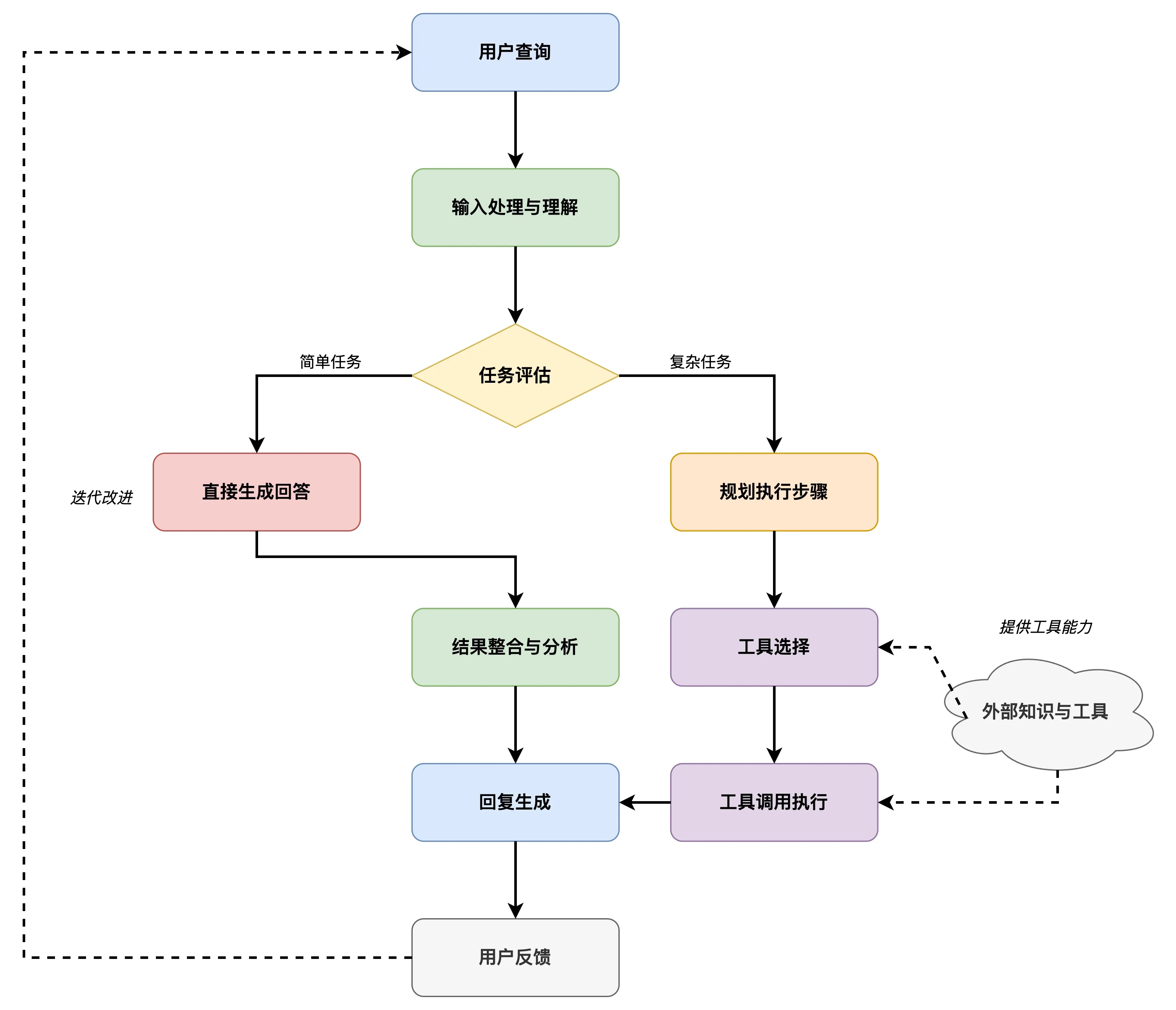
Figure 7.7 Agent Working Principle
LLM Agent combines the powerful language understanding and generation capabilities of large language models with key modules such as planning, memory, and tool use, achieving autonomy and complex task processing capabilities beyond traditional large models. This capability makes LLM Agents have broad application potential in many vertical fields (such as law, medicine, finance, etc.), as shown in Figure 7.7 Agent Working Principle.
7.3.2 Types of LLM Agents
Although the concept of LLM Agents is still rapidly developing, according to their design philosophy and ability emphasis, we can roughly classify them into several categories:
Task-Oriented Agents (Task-Oriented Agents):
- Characteristics: Focus on completing specific, clearly defined tasks in certain fields, such as customer service, code generation, data analysis, etc.
- Working Method: Usually have preset processes and callable specific tool sets. LLM mainly responsible for understanding user intent, filling task slots, generating responses, or calling appropriate tools.
- Examples: Chatbots specifically for restaurant reservations, code assistants that assist programming (such as GitHub Copilot, which shows agent characteristics in some advanced features).
Planning and Reasoning Agents (Planning & Reasoning Agents):
- Characteristics: Emphasize the ability to autonomously decompose complex tasks, formulate multi-step plans, and adjust according to environmental feedback. They usually require stronger reasoning capabilities.
- Working Method: Often adopt specific thinking frameworks, such as ReAct (Reason+Act), allowing the model to first perform "reasoning" (analyzing the current situation and required actions), then execute "actions" (calling tools), and then proceed to the next round of thinking based on the tool's returned results. Chain-of-Thought (CoT) and other prompting techniques are also the basis for their reasoning.
- Examples: Research agents that need to integrate web search, calculators, and database queries to answer complex questions, or agents that can independently complete tasks such as "write a report on a topic and accompany it with relevant data charts".
Multi-Agent Systems (Multi-Agent Systems):
- Characteristics: Composed of multiple agents with different roles or capabilities working together to accomplish a grander goal.
- Working Method: Agents can communicate, collaborate, debate, or even compete. For example, one agent is responsible for planning, another for execution, and another for review.
- Examples: Simulating a software development team (product manager agent, programmer agent, tester agent) to automatically generate and test code; simulating a company organization structure to complete business planning. AutoGen, ChatDev, and other frameworks support the construction of such systems.
Exploration and Learning Agents (Exploration & Learning Agents):
- Characteristics: These agents not only perform tasks but also actively learn new knowledge, skills, or optimize their own strategies during interaction with the environment, similar to the concept of agents in reinforcement learning.
- Working Method: May include more complex memory and reflection mechanisms, capable of adjusting future plans and actions based on successful or failed experiences.
- Examples: Agents that can explore and learn how to operate in unknown software environments, or agents that continuously improve their strategies while playing games.
7.3.3 Building a Tiny-Agent
We will construct a Tiny-Agent based on the openai library and its tool_calls functionality. This Agent is a simple task-oriented Agent that can answer some simple questions based on user input.
The final implementation effect is shown in Figure 7.8:
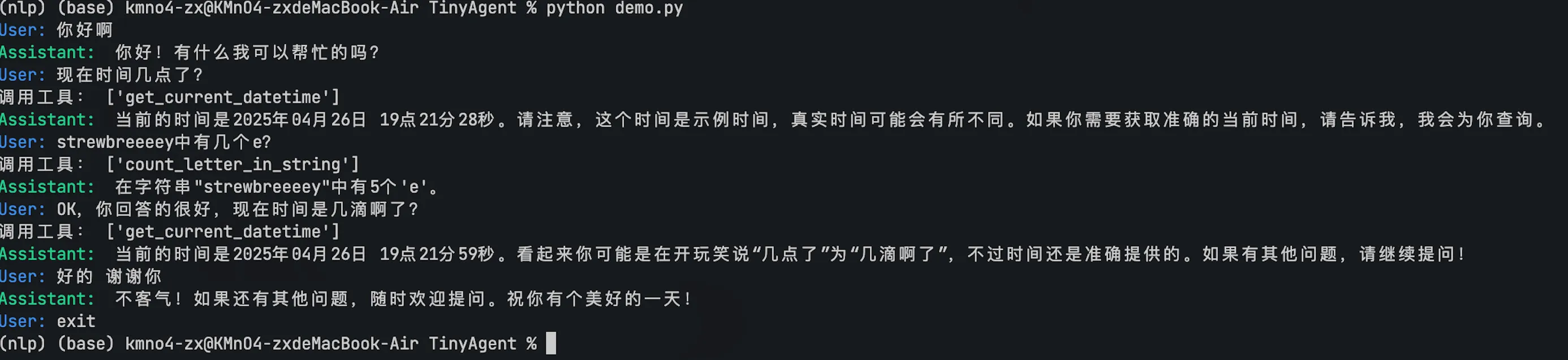
Figure 7.8 Effect Diagram
Step 1: Initialize Client and Model
First, we need a client that can call a large model. Here, we use the openai library and configure it to point to a compatible OpenAI API service terminal, such as SiliconFlow. At the same time, specify the model to be used, such as Qwen/Qwen2.5-32B-Instruct.
from openai import OpenAI

# Initialize OpenAI client
client = OpenAI(
    api_key="YOUR_API_KEY",  # Replace with your API Key
    base_url="https://api.siliconflow.cn/v1", # Use SiliconFlow's API address
)

# Specify the model name
model_name = "Qwen/Qwen2.5-32B-Instruct"
Note: You need to replace
YOUR_API_KEYwith a valid API Key obtained from SiliconFlow or other service providers.
Step 2: Define Tool Functions
We define the tool functions that the Agent can use in the src/tools.py file. Each function needs to have a clear docstring describing its function and parameters, as this will be used to automatically generate the JSON Schema for the tool.
# src/tools.py
from datetime import datetime

# Get current date and time
def get_current_datetime() -> str:
    """
    Get the current date and time.
    :return: String representation of the current date and time.
    """
    current_datetime = datetime.now()
    formatted_datetime = current_datetime.strftime("%Y-%m-%d %H:%M:%S")
    return formatted_datetime

def count_letter_in_string(a: str, b: str):
    """
    Count the number of occurrences of a letter in a string.
    :param a: The string to search.
    :param b: The letter to count.
    :return: The number of times the letter appears in the string.
    """
    return str(a.count(b))

def search_wikipedia(query: str) -> str:
    """
    Search for the first three page summaries on Wikipedia for a specified query.
    :param query: The query string to search.
    :return: A string containing the first three page summaries.
    """
    page_titles = wikipedia.search(query)
    summaries = []
    for page_title in page_titles[: 3]:  # Take the first three page titles
        try:
            # Use the wikipedia module's page function to get the Wikipedia page object for the specified title.
            wiki_page = wikipedia.page(title=page_title, auto_suggest=False)
            # Get the page summary
            summaries.append(f"Page: {page_title}\nSummary: {wiki_page.summary}")
        except (
                wikipedia.exceptions.PageError,
                wikipedia.exceptions.DisambiguationError,
        ):
            pass
    if not summaries:
        return "Wikipedia did not find suitable results"
    return "\n\n".join(summaries)
# ... (other tool functions may be present)
To help the OpenAI API understand these tools, we need to convert them into a specific JSON Schema format. This can be done using the function_to_json helper function in src/utils.py.
# src/utils.py (partial)
import inspect

def function_to_json(func) -> dict:
    # ... (function implementation details)
    # Return a dictionary that conforms to the OpenAI tool schema
    return {
        "type": "function",
        "function": {
            "name": func.__name__,
            "description": inspect.getdoc(func),
            "parameters": {
                "type": "object",
                "properties": parameters,
                "required": required,
            },
        },
    }
Step 3: Construct the Agent Class
We define the Agent class in the src/core.py file. This class is responsible for managing the conversation history, calling the OpenAI API, handling tool calls, and executing tool functions.
# src/core.py (partial)
from openai import OpenAI
import json
from typing import List, Dict, Any
from utils import function_to_json
# Import the defined tool functions
from tools import get_current_datetime, add, compare, count_letter_in_string

SYSTEM_PROMPT = """
You are an AI assistant named "Don't Use Onion and Garlic". Your output should be consistent with the user's language.
When the user's question requires calling a tool, you can call the appropriate tool function from the provided list.
"""

class Agent:
    def __init__(self, client: OpenAI, model: str = "Qwen/Qwen2.5-32B-Instruct", tools: List=[], verbose : bool = True):
        self.client = client
        self.tools = tools
        self.model = model
        self.messages = [
            {"role": "system", "content": SYSREM_PROMPT},
        ]
        self.verbose = verbose

    def get_tool_schema(self) -> List[Dict[str, Any]]:
        # Get the JSON schema of all tools
        return [function_to_json(tool) for tool in self.tools]

    def handle_tool_call(self, tool_call):
        # Handle tool call
        function_name = tool_call.function.name
        function_args = tool_call.function.arguments
        function_id = tool_call.id

        function_call_content = eval(f"{function_name}(**{function_args})")

        return {
            "role": "tool",
            "content": function_call_content,
            "tool_call_id": function_id,
        }

    def get_completion(self, prompt) -> str:

        self.messages.append({"role": "user", "content": prompt})

        # Get the model's completion response
        response = self.client.chat.completions.create(
            model=self.model,
            messages=self.messages,
            tools=self.get_tool_schema(),
            stream=False,
        )

        # Check if the model called a tool
        if response.choices[0].message.tool_calls:
            self.messages.append({"role": "assistant", "content": response.choices[0].message.content})
            # Handle tool calls and add the results to the message list
            tool_list = []
            for tool_call in response.choices[0].message.tool_calls:
                # Process the tool call and return the result to the model
                self.messages.append(self.handle_tool_call(tool_call))
                tool_list.append([tool_call.function.name, tool_call.function.arguments])
            if self.verbose:
                print("Calling tools:", response.choices[0].message.content, tool_list)
            # Get the model's completion response again, this time including the tool call results
            response = self.client.chat.completions.create(
                model=self.model,
                messages=self.messages,
                tools=self.get_tool_schema(),
                stream=False,
            )

        # Add the model's completion response to the message list
        self.messages.append({"role": "assistant", "content": response.choices[0].message.content})
        return response.choices[0].message.content
The workflow of the Agent is as follows:
- Receive user input.
- Call the large model (e.g., Qwen), and inform it of the available tools and their schema.
- If the model decides to call a tool, the Agent parses the request and executes the corresponding Python function.
- The Agent returns the result of the tool execution to the model.
- The model generates the final response based on the tool results.
- The Agent returns the final response to the user.
As shown in Figure 7.9, the Agent calls the tool process:
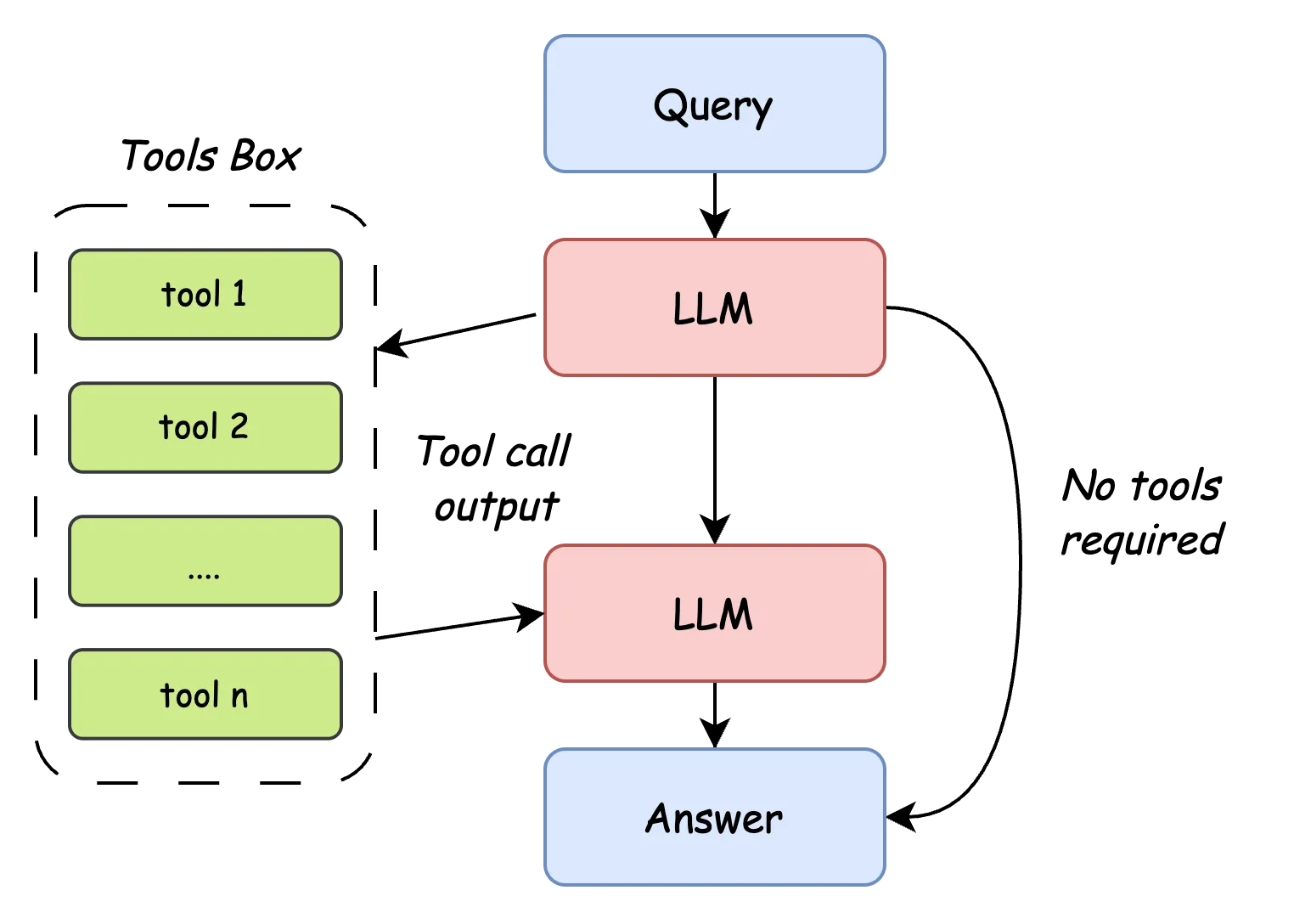
Figure 7.9 Agent Workflow
Step 4: Run the Agent
Now we can instantiate and run the Agent. In the demo.py file's if __name__ == "__main__": section, we provide a simple command-line interactive example.
# demo.py (partial)
if __name__ == "__main__":
    client = OpenAI(
        api_key="YOUR_API_KEY", # Replace with your API Key
        base_url="https://api.siliconflow.cn/v1",
    )

    # Create an Agent instance, passing in the client, model name, and list of tool functions
    agent = Agent(
        client=client,
        model="Qwen/Qwen2.5-32B-Instruct",
        tools=[get_current_datetime, add, compare, count_letter_in_string],
        verbose=True # Set to True to see tool call information
    )

    # Start an interactive dialogue loop
    while True:
        # Use colored output to distinguish user input and AI answers
        prompt = input("\033[94mUser: \033[0m")  # Blue display of user input prompt
        if prompt.lower() == "exit":
            break
        response = agent.get_completion(prompt)
        print("\033[92mAssistant: \033[0m", response)  # Green display of AI assistant answer
Example Interaction:
User: Hello
Assistant: Hello! How can I assist you?
User: Which is larger, 9.12 or 9.2?
Calling tools: ['compare']
Assistant: 9.2 is larger than 9.12.
User: Why?
Assistant: When comparing 9.12 and 9.2, we can consider them as 9.12 and 9.20. Since 9.20 has a 0 in the second decimal place, while 9.12 has a 2 in the second decimal place, under the condition that the first decimal place is equal, 9.20 (i.e., 9.2) is greater than 9.12. Therefore, 9.2 is larger than 9.12.
User: How many 'r's are in 'strawberry'?
Calling tools: ['count_letter_in_string']
Assistant: There are 3 letters 'r' in the word "strawberry".
User: Are you sure?
Calling tools: ['count_letter_in_string']
Assistant: Yes, I am sure. There are indeed 3 letters 'r' in the word "strawberry". Let's confirm again, "strawberry" has 'r' appearing three times.
User: Okay, you're very thin, what time is it now?
Calling tools: ['get_current_datetime']
Assistant: The current time is April 26, 2025, 17:01:33. However, I noticed that you mentioned "you're very thin," which seems to be a typo. If you have any other questions or need further assistance, please let me know!
User: exit
We also prepared a Streamlit application that can be run locally to demonstrate the Agent's capabilities. Run streamlit run web_demo.py to run it, and below is the Agent's operation effect.
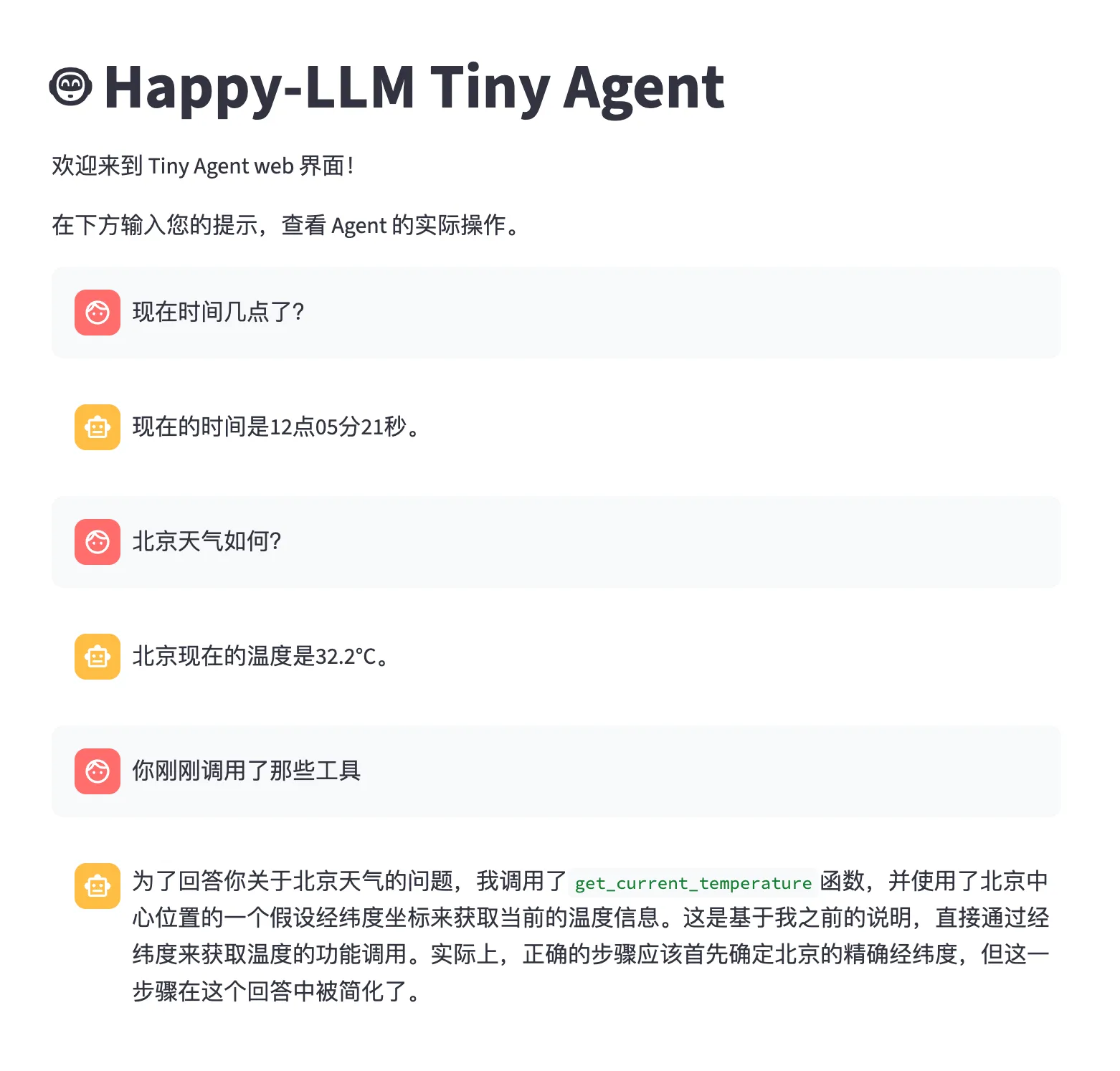
Figure 7.10 Streamlit Demo
References
[1] Hugging Face. (2023). Open LLM Leaderboard: Open Source Large Language Model Benchmark Platform. https://huggingface.co/spaces/open-llm-leaderboard/open_llm_leaderboard
[2] awacke1. (2023). LMSYS Chatbot Arena Leaderboard: Large Language Model Arena Evaluation Platform. https://huggingface.co/spaces/awacke1/lmsys-chatbot-arena-leaderboard
[3] OpenCompass Team. (2023). OpenCompass: Unified Evaluation Platform for Large Models. https://rank.opencompass.org.cn/home
[4] OpenCompass Financial List Team. (2024). CFBENCHMARK: Large Model Evaluation List for the Financial Field. https://specialist.opencompass.org.cn/CFBenchmark
[5] OpenCompass Security List Team. (2024). Flames: Large Model Security Evaluation List. https://flames.opencompass.org.cn/leaderboard
[6] OpenCompass General Knowledge List Team. (2024). BotChat: Large Model General Dialogue Ability Evaluation. https://botchat.opencompass.org.cn/
[7] OpenCompass Legal List Team. (2024). LawBench: Large Model Evaluation in the Legal Field. https://lawbench.opencompass.org.cn/leaderboard
[8] OpenCompass Medical List Team. (2024). MedBench: Large Model Evaluation in the Medical Field. https://medbench.opencompass.org.cn/leaderboard
[9] Zhi Jing, Yongye Su, and Yikun Han. (2024). When Large Language Models Meet Vector Databases: A Survey. arXiv preprint arXiv:2402.01763.
[10] Yunfan Gao, Yun Xiong, Xinyu Gao, Kangxiang Jia, Jinliu Pan, Yuxi Bi, Yi Dai, Jiawei Sun, Meng Wang, and Haofen Wang. (2024). Retrieval-Augmented Generation for Large Language Models: A Survey. arXiv preprint arXiv:2312.10997.
[11] Zhiruo Wang, Jun Araki, Zhengbao Jiang, Md Rizwan Parvez, and Graham Neubig. (2023). Learning to Filter Context for Retrieval-Augmented Generation. arXiv preprint arXiv:2311.08377.
[12] Ori Ram, Yoav Levine, Itay Dalmedigos, Dor Muhlgay, Amnon Shashua, Kevin Leyton-Brown and Yoav Shoham. (2023). In-Context Retrieval-Augmented Language Models. arXiv preprint arXiv:2302.00083.