Token Permissions and Least Privilege
This document introduces the auto-generation mechanism of ATOMGIT_TOKEN, configuration methods for the permissions field, and practical examples of the principle of least privilege.
The default pipeline Token (ATOMGIT_TOKEN) has repository-level read/write access. However, under the principle of least privilege, the Token should be restricted to only the minimum permissions required by the job to prevent unauthorized operations.
Configuration Instructions
Automatic Generation of ATOMGIT_TOKEN
Each time a pipeline runs, AtomGit Action automatically generates an ATOMGIT_TOKEN for:
- Cloning code repositories
- Pushing build artifacts
- Creating PR and Issue comments
- Managing project resources
The permission scope of ATOMGIT_TOKEN is controlled by the permissions field in the workflow.
Explanation of the permissions Field
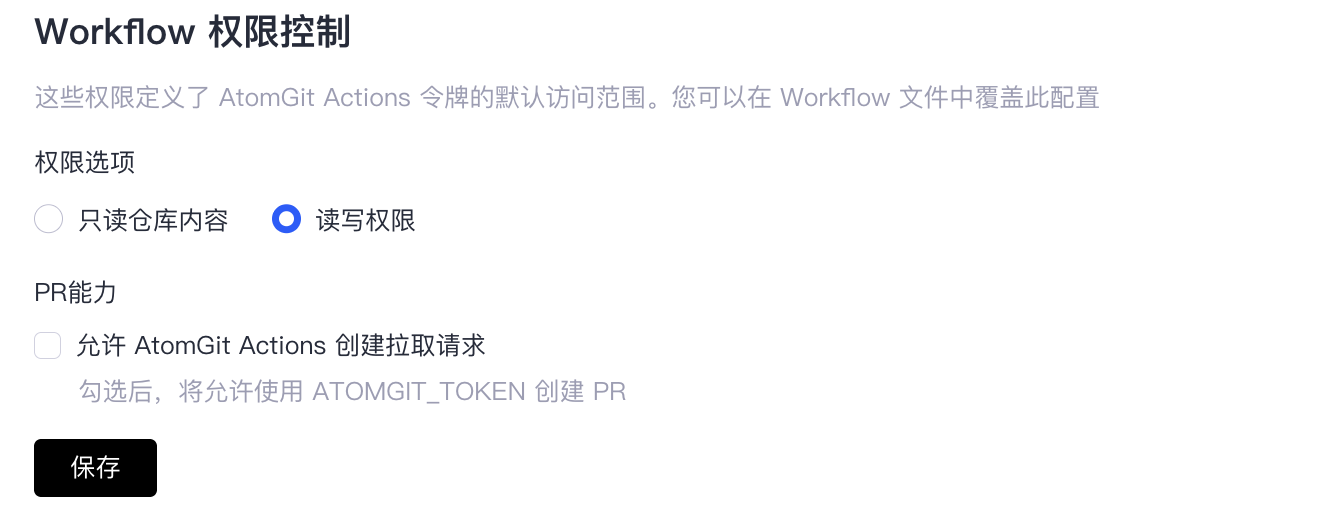
Mapping of Workflow Permission Controls
- Read-only repository content:
repository: read - Read-write access:
repository: write,project: write - Allows AtomGit Actions to create pull requests:
pr: write
Example of Top-Level permissions:
# .gitcode/workflows/ci.yml
name: CI Pipeline

permissions:
  project: read           # Read project information
  pr: write               # PR write operations (create, comment, merge)
  issue: read             # Read Issues
  note: write             # Comment/Note write operations
  repository: write       # Repository write operations (push)
  action: write           # Action read/write operations
Permission Type Mapping
| Permission Domain | read | write | none | Description |
|---|---|---|---|---|
| project | Read project information | Modify project settings | No access | Project metadata operations |
| pr | Read PRs | Create/comment/merge PRs | No access | Pull Request operations |
| issue | Read Issues | Create/comment Issues | No access | Issue operations |
| note | Read comments | Create comments | No access | General comment operations |
| repository | Clone/read | Push/modify repository | No access | Code repository operations |
| action | Read actions | Read/write/run actions | No access | Pipeline operations |
Practicing the Principle of Least Privilege
Principle: Each workflow declares only the permissions it needs; nothing more.
Example 1: Read-only Lint Job
on:
  workflow_dispatch:

permissions:
  repository: read         # Clone code only
  pr: none                 # Do not interact with PRs
  issue: none              # Do not interact with Issues
  note: none               # Do not post comments
  project: none            # Do not read project information

stages:
  lint:
    name: Code Check
    jobs:
      Lint:
        name: code-lint
        runs-on: [ubuntu-latest, x64, slim]
        steps:
          - name: Run lint
            run: npm run lint
Example 2: Test Job Requiring PR Comments
on:
  workflow_dispatch:

permissions:
  repository: read         # Clone code
  pr: write                # Comment test results on the PR
  issue: none
  note: none
  project: none

stages:
  test:
    name: Testing
    jobs:
      report:
        name: report-results
        runs-on: [ubuntu-latest, x64, small]
        steps:
          - name: Run script
            run: |
              pytest
              curl -X POST "https://atomgit.com/api/v5/repos/${{ atomgit.repository }}/pulls/${{ atomgit.event.pr.number }}/comments" \
                -H "Authorization: token $ATOMGIT_TOKEN" \
                -d '{"body": "All tests passed ✅"}'
Relationship Between permissions and ATOMGIT_TOKEN
permissions Configuration | Actual ATOMGIT_TOKEN Permissions |
|---|---|
permissions not declared | Uses permissions defined in repository settings |
Top-level permissions declared | All jobs inherit top-level permissions |
permissions: {} (empty) | ATOMGIT_TOKEN only gets minimal default permissions (repository:read) |
Key Security Note: When a
pull_requestevent originates from a forked repository, theATOMGIT_TOKENwill only have read permissions, regardless of howpermissionsare declared. This is AtomGit Action's security isolation mechanism. If write permissions are required, use thepull_request_targetevent instead.